
Here's a question we ask organizations during transition work: who can get into the bank account?
Sometimes the answer comes right away. Often there's a pause. And sometimes the answer is essentially, "Well... Pat can."
That becomes a much bigger problem the day Pat leaves.
Access quietly attaches to a person
Bank accounts, email platforms, software, social media and shared systems can all end up concentrated with one individual. It rarely happens on purpose. The person who set up the account is the person who still holds the login.
So picture it: your Executive Director leaves tomorrow. They won't take the laptop or the office keys with them. They'll take access.
Can someone else get into the organization's bank account?
Can someone else get into the primary email account?
When a login requires a verification code, whose phone receives it?
These aren't questions to answer after someone has already left.
2FA is not an access plan
Turning on two-factor authentication is good security practice. But here's the question we don't ask often enough: who controls the second factor?
If the verification code for an organizational account goes to one employee's personal phone, what happens when that employee leaves? If the recovery email belongs to a former staff member, who can reset the account?
An organization can know the password and still be unable to get in. Having 2FA enabled and having a sustainable organizational access plan are not the same thing. Good transition planning accounts for both security and continuity.
Not every second factor (2FA) is equal
A code sent by text message is better than no second factor. But the method matters. CISA "strongly urges all organizations to implement phishing-resistant MFA", and says number matching is a weaker but useful interim step for organizations that use push notifications (MFA = multi-factor authentication).
For a small nonprofit, the practical version is one question per critical account: can the organization own the second factor? A security key or passkey that belongs to the organization, and lives with the organization, doesn't depend on one person's phone. Not every platform supports it. Where one does, use it.
Start with a list
You can't fix what nobody has written down. Build one inventory of the accounts your organization can't operate without, then fill in the four columns that cause the most trouble.
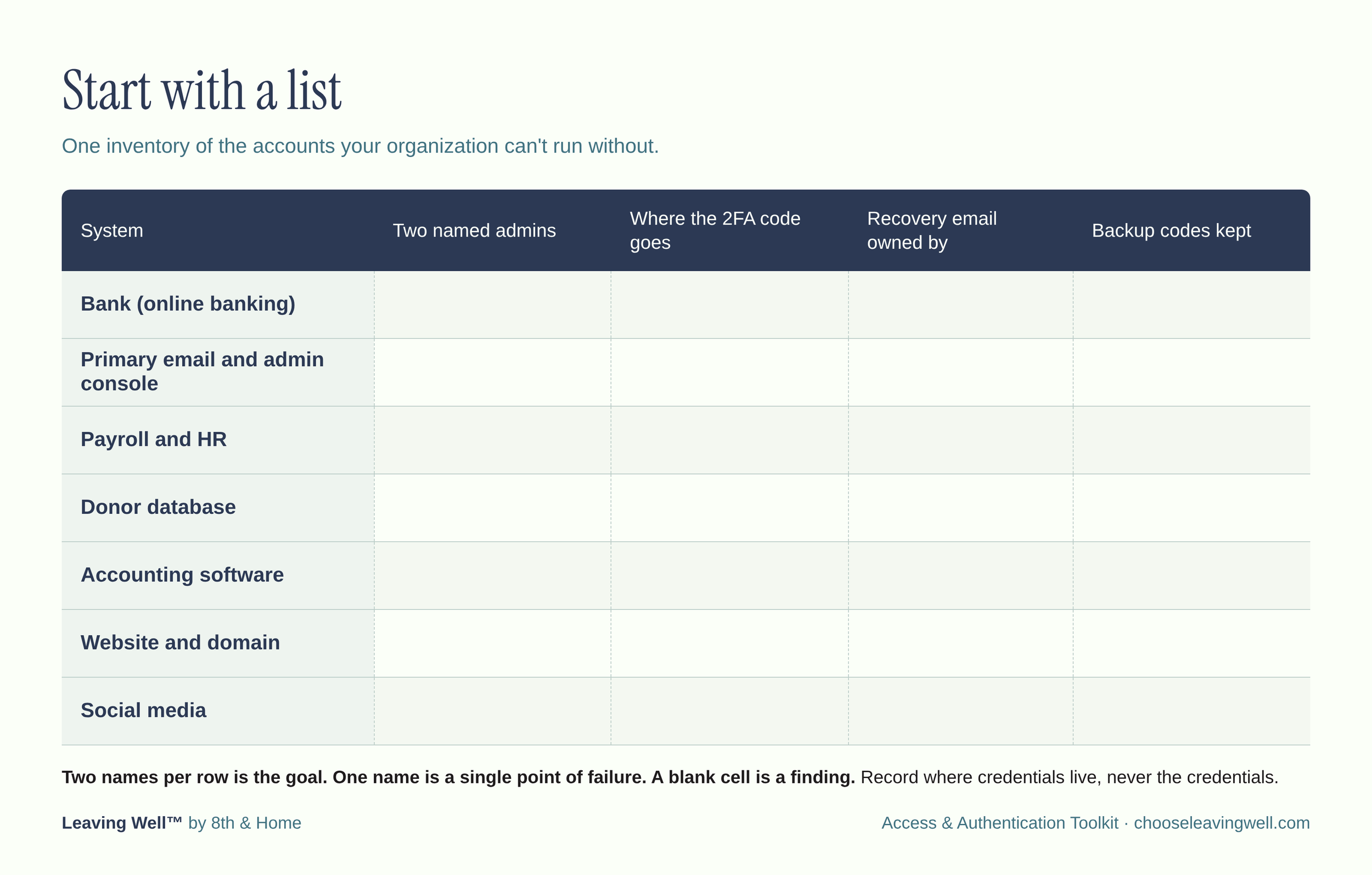
Two names per row is the standard to aim for. One name is fine, but that person becomes a single point of failure. A blank cell is a red flag.
Keep the list itself safe. It should record where credentials live, never listing the credentials (a spreadsheet full of passwords just creates a new risk).
What an access plan needs to settle
Ownership. Accounts are registered to the organization, under an organizational email address, not a staff member's personal one.
At least two administrators. This applies to the email admin console, the website domain, payroll and every other system you can't run without. Ask your bank whether being an authorized signer is the same as having administrator rights over online banking. Don't assume it is.
An organization-controlled second factor. If a personal phone is the only option today, write that down and set a date to change it.
Recovery paths that belong to the organization. Recovery emails and phone numbers should not point to an individual. Backup codes should be stored where at least two authorized people can reach them.
A shared password manager held at the organizational level, so credentials don't live in one person's browser or memory.
Everyone outside payroll. Contractors, volunteers, former board members and any agency running your website or social accounts have access too. Put them on the list.
A review rhythm. Check the list at least once a year and every time a staff or board member joins or leaves.
When someone gives notice
Start the day notice is given, not the last day. People are most helpful, and know the most, while they're still on the team. Order matters here:
Have the departing person show, with a second person watching, that someone else can sign in to each critical account.
Move second factors to an organizational device or key, and update recovery emails and phone numbers.
Change every credential the person knew, and generate new backup codes.
Remove their access, sign out their active sessions, and decide what happens to their email and files.
Update the inventory so it still tells the truth.
If the departure is sudden, every one of these steps gets harder. That's the case for doing the work before anyone is leaving.
What boards should ask
Boards don't need to manage logins. They do need to know the organization can function without any one person. Five questions to bring to your next meeting:
Besides the Executive Director, who can get into our bank accounts and email admin console? Name them.
Where is the access list, and when was it last reviewed?
Does any critical 2FA code go to one person's personal phone?
Who holds the recovery codes?
When did someone other than the Executive Director last prove they could sign in?
If your treasurer or board chair can answer these within a day, you have an access plan. If they can't, you have a conversation to schedule.
Access is part of Leaving Well
Leadership transitions reveal things. Sometimes they reveal how much institutional knowledge was living with one person. Sometimes they reveal that an account everyone assumed belonged to the organization is tied to someone's personal email or phone.
That's why access and authentication belong in conversations about succession and transition. Succession planning isn't only about who does what. It's also about making sure the people who stay can keep doing the work.
Leaving well isn't only about what the departing leader hands over. It's also about whether the people who remain have what they need to move forward. Access shouldn't leave when a person does.
Introducing the Access & Authentication Toolkit
So we built something to help. The Access & Authentication Toolkit is a practical, nine-part guide that helps nonprofit leaders and boards make sure critical organizational access doesn't live with just one person.
Use it to examine how access is managed today, who controls authentication, and what needs to be documented before a transition makes the answers harder to find. The goal is simple: "Who can get into the account?" should always have an actual answer, not a shrug.
→ Get the Access & Authentication Toolkit for $79
Access and authentication may feel like small operational details. During a leadership transition, they can become anything but.
Naomi Hattaway is President and Lead Advisor of 8th & Home and the founder of Leaving Well™.
Sources: CISA, Guidance on Phishing-Resistant and Numbers Matching MFA; toolkit page.